
In a flexographic printing workshop, the most frustrating issue
is often not a machine breakdown, but rather print results that fail to
meet expectations. Problems include solid areas that are too thick,
slow drying, or halftone dots merging together (due to excessive ink
transfer); or conversely, prints that appear patchy, show the substrate
through the ink, or lack sufficient ink coverage (due to inadequate
ink transfer).
When sales representatives receive complaints from
clients—such as, “ The print quality isn’t what we expected; could
the anilox roller be the problem? ”—they don’t simply jump to
providing a quote for a new roller. Instead, they ask three key
questions: “ What substrate are you printing on? What is the
machine speed? And what are the current line count and BCM
(ink-carrying capacity) specifications? ” Experienced sales staff
know that while the anilox roller is often called the “heart” of the
flexographic printing process, it is rarely the sole culprit when ink
transfer issues arise. Today, we will walk you through a standard
troubleshooting process to help you identify the root cause.Before adjusting your press, examine the defects in your rejected
prints:
- Excessive ink transfer: Solid areas appear overly thick—sometimes
even reflective—halftone dots expand (causing “ plugging ” or
filling in), and the ink fails to dry thoroughly, leading to smudging.
- Insufficient ink transfer: The printed surface appears patchy or
streaky; solid areas lack density, revealing the substrate; and fine
highlight dots disappear entirely
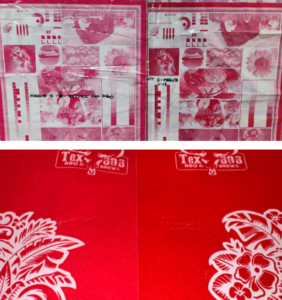
When a client complains that “ the color isn’t strong enough, no
matter how much ink I add ”,the issue is often clogged anilox cells.
Conversely, complaints about “ ink smearing on the back of the
sheet or slow drying ” are typically caused by an excessive volume
of ink being transferred.
If there is too much ink transfer, what should you check first?
- Doctor blade system: The blade edge may be worn, or the angle
may be too shallow (for a reverse-angle doctor blade, this is
typically around 30°), failing to effectively scrape excess ink off the
roller surface.
- Ink viscosity: If the viscosity is too low, the ink becomes too thin
and spreads uncontrollably across the entire surface.
- Excessive pressure: Too much pressure between the anilox roller
and the printing plate cylinder can “ squeeze ” the ink out of the
anilox cells.
If there is too little ink transfer, what should you check first?
- Clogged cells: Dried ink or impurities fill the cells—this is the
most common culprit.
- Anilox roller wear: Long-term friction from the doctor blade wears
down the cell walls, causing an irreversible reduction in cell volume
(BCM).
- Excessive ink viscosity: The ink is too thick, becoming trapped inthe cells and failing to release.
- Excessive doctor blade pressure: This effectively scrapes the ink
right out of the cells.
Q: How can you identify a clogged anilox roller? What is the
difference between wear and clogging?
A: Use a high-magnification loupe. Clogging appears as shiny,
dried-on foreign matter inside the cells; this can often be resolved
through deep cleaning (e.g., using an ultrasonic cleaner). Wear, by
contrast, involves the wearing down of the cell walls (the partitions
between cells), resulting in a permanent loss of volume—this cannot
be repaired and requires either re-engraving or replacing the roller.
Q: What is the ideal doctor blade angle? How does ink viscosity
affect ink transfer?
A: A reverse-angle doctor blade is typically set at around 30°. If the
angle is too shallow, ink may leak (resulting in excessive ink
transfer); if it is too steep, it can “ scoop ” the ink out of the cells
(resulting in insufficient ink transfer). If ink viscosity is too low, the
ink becomes too fluid, leading to excessive transfer; if it is too high,
the ink fails to release from the cells, leading to insufficient transfer.
Q: How often should rollers be cleaned or replaced?
A: Perform surface cleaning daily; schedule deep cleaning (such as
ultrasonic cleaning) periodically, based on production volume. If,following deep cleaning, the print density still fails to meet
requirements—and testing confirms a significant reduction in BCM
(cell volume)—it is time to consider replacing the roller.